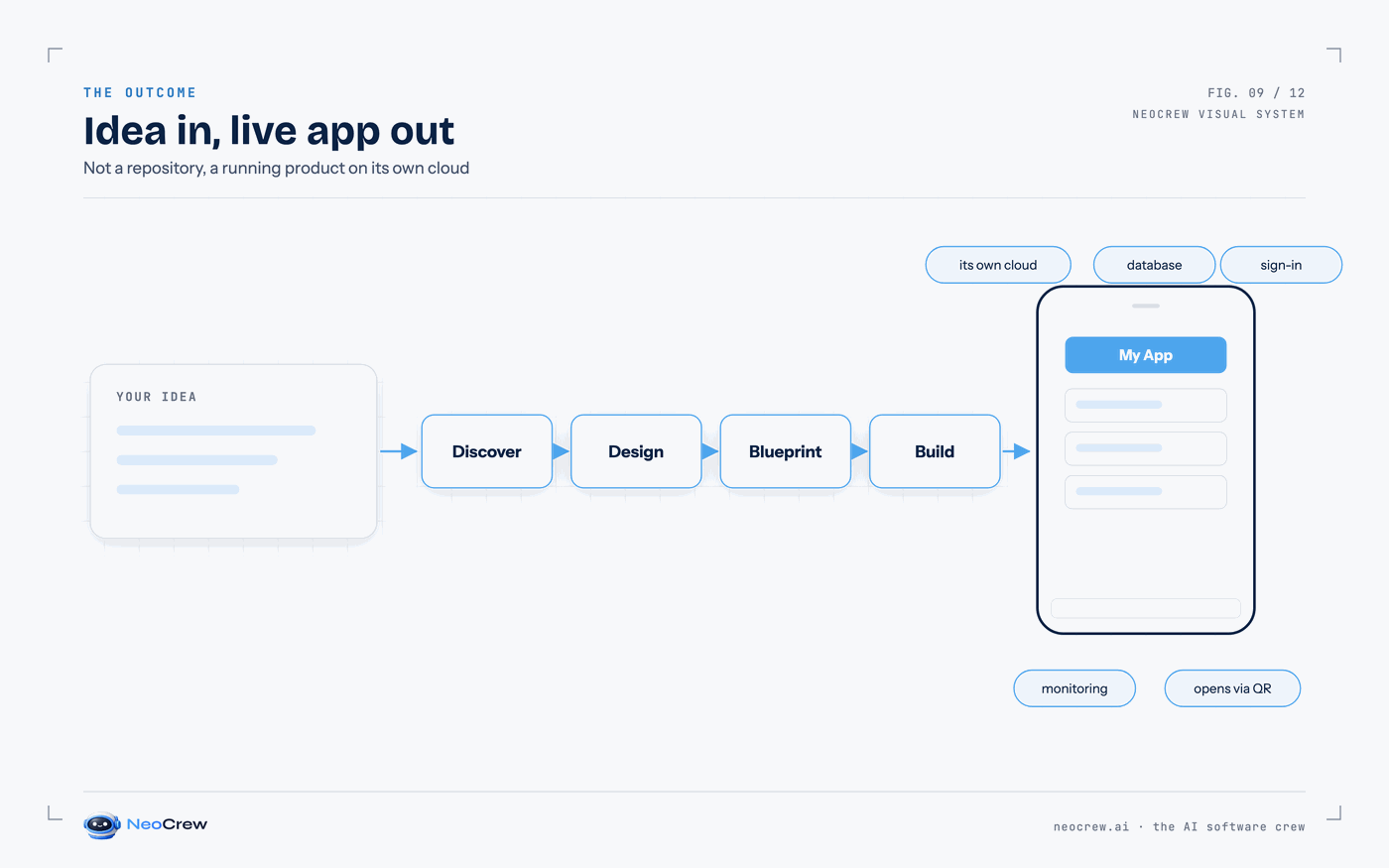
Quick answer: Most AI coding tools hand you code, a repository you still have to host, secure, monitor, and keep alive. NeoCrew hands you a running application: deployed on its own isolated cloud with its own database, sign-in, and admin console, monitored from the moment it serves traffic, openable on your phone by scanning a QR code, and maintained by a repair loop held to the original approved plan. The output is a product, not a project.
There’s a quiet sleight of hand in most “AI builds your app” demos. The AI writes code, the code runs locally, the screen fills with something that looks like an app, and the demo ends there, on a high note, right before the hard part begins.
Because a repository is not a product. A folder of code that runs on the builder’s machine is the start of the work that turns an idea into something real people can use, not the end of it. Somebody still has to host it, give it a real database, wire up sign-in, provision the infrastructure, put it behind HTTPS, add monitoring, and keep the whole thing alive when it breaks at 2am. That somebody, in most tools, is you.
NeoCrew was built to close that gap. The thing you receive at the end isn’t code you now have to operationalise. It’s a live, monitored application, already running, already deployed, already provable. Here’s what that actually means.
What’s the difference between code and a product?
The gap between “the code works” and “this is a product” is made of all the unglamorous things that never fit in a demo. Put them side by side and the difference is stark.
| What most tools give you | What a product actually needs |
|---|---|
| Code that runs locally | A deployed app running on real infrastructure |
| A SQLite file or a dev database | A real database with proper access control |
| “Add your own auth” | Working sign-in, sessions, and password recovery |
| A localhost URL | HTTPS addresses for the app, admin, and API |
| “Deploy it yourself” | Provisioned cloud, secrets, and monitoring |
| Hope it keeps working | A repair loop that holds the app to its plan |
Every row on the right is work. In the traditional world, it’s work you hire for. In most AI tools, it’s work the demo quietly leaves at your feet. NeoCrew’s position is simple: if it isn’t deployed, proven, and monitored, the job isn’t done, so the platform does the right-hand column, not just the left.
What exactly do you receive?
When a NeoCrew build finishes, the deliverable is a running application with everything a real product carries:
- Its own isolated cloud infrastructure. Not a shared tenant, the app gets its own identity, its own database, its own storage, its own compute, its own addresses. One app’s data and load never mingle with another’s.
- A real database with access control forced on. Users can’t see each other’s rows, because the database itself enforces it, not because the application remembers to.
- Working sign-in and an admin console. Registration, verified sign-in, sessions, password recovery, and a first administrator, plus an admin surface for managing the app, all drawn from modules proven in production and custom-designed for your brand.
- Monitoring wired in before it serves traffic. The app is watched from its first request, so problems surface as reports rather than as silence.
- A phone you can hold. On ship, the mobile app opens on a real phone by scanning a QR code. Web apps deploy as a web build of the same product. The thing you’ve been approving as screens becomes a thing in your hand.
This is why we say the output is a product, not a repository. You don’t receive instructions for building a house. You receive the house, with the lights on.
How does an idea become a live app?
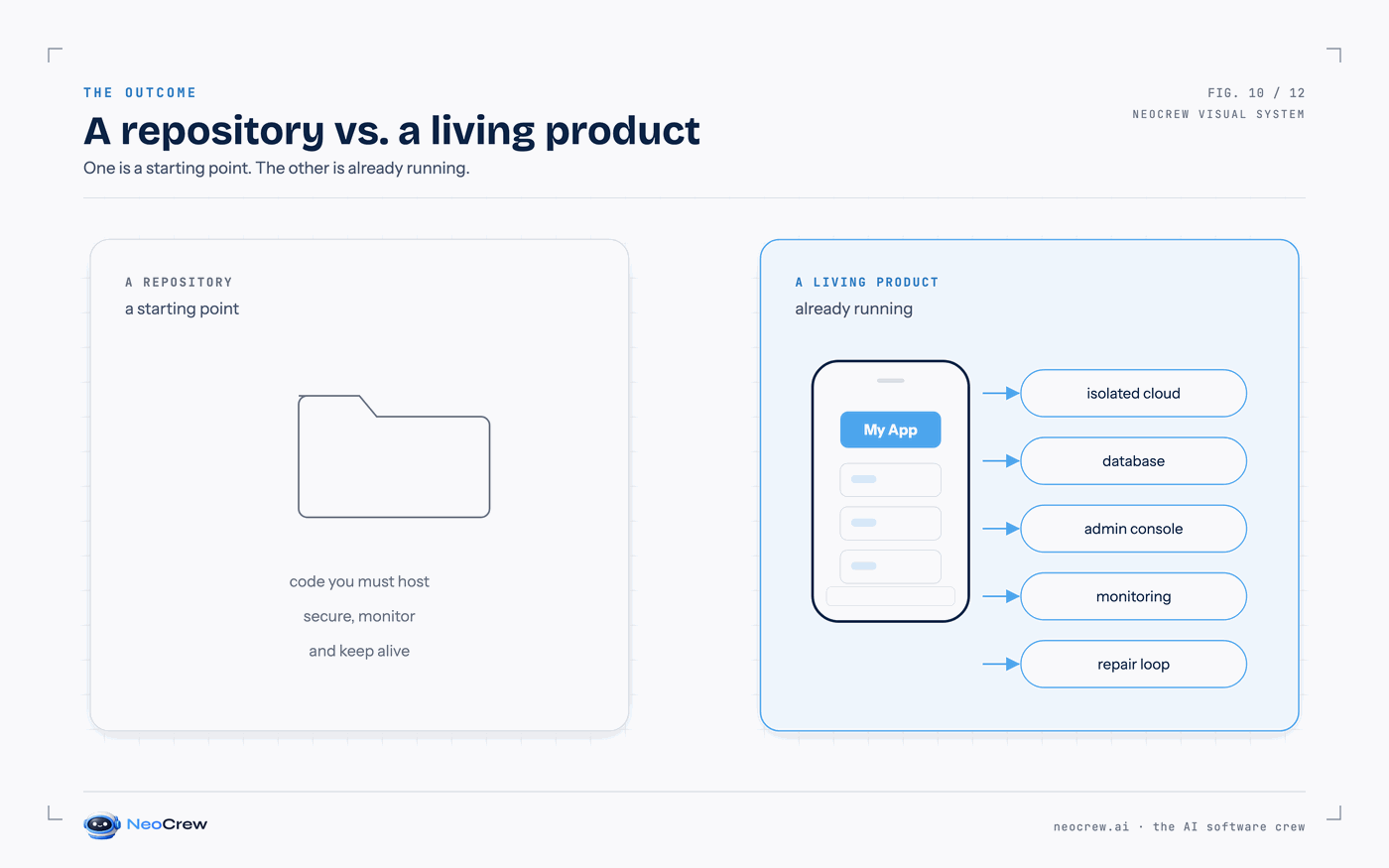
The journey from a sentence to a running product follows one linear flow, with a human decision at each meaningful step and the crew doing everything in between.
- The free first look. You describe your idea. In under a minute, you get it back, a short overview, a name, and a few sketch screens. Not the design; a first glimpse, so you can see your idea before paying for anything.
- Discover. The crew turns the idea into a stakeholder-ready requirements document, asking only the questions it genuinely needs, and you confirm the scope.
- Design. Working, responsive screens and a design system, custom to your brand, which you approve.
- Blueprint. A plain-language blueprint you approve once; then the full technical architecture is designed for you.
- Build. The approved contract becomes a verified application, sliced into parts, tested against tests the builder can’t see, assembled and proven in a sealed room.
- Deploy. With your consent, the app is provisioned onto its own cloud and proven live with real checks.
- Live. The running app and its admin console, a phone simulator, QR codes, and one button to tell NEO what to change next.
Each arrow is handled by the crew. Each stop is a clear decision for you, which is the subject of our companion piece on the ten decisions a founder actually makes.
What gets provisioned for each app?
“Its own cloud” isn’t a slogan, it’s a specific set of things stood up per project, automatically, on deploy.
| Provisioned per app | What it gives the product |
|---|---|
| Identity | A dedicated user pool, verification mail, and the first administrator |
| Database | Its own database, with row-level access control forced on every table |
| Media | Its own private storage for uploads, when the product handles media |
| Compute | A dedicated instance with its own scoped permissions |
| Edge | HTTPS addresses for the app, the admin console, and the API |
| Secrets | A managed, scoped path loaded at boot, keys never sit in the code |
| Monitoring | Error tracking wired in before the app serves its first request |
And it isn’t trusted blindly. After every deploy, the live app is probed from the outside, HTTPS only, protected paths refused, every surface serving, and then real throwaway users drive the real sign-in flow, a media round-trip, and a live AI answer on the running server. Only then does “deployed” mean deployed.
Why does each app get its own isolated cloud?
“Its own cloud” is a deliberate architectural choice, not a convenience, and it matters more than it first sounds.
In a shared-tenant setup, many apps live in one system, separated only by careful application code. It works until it doesn’t: one app’s traffic spike slows its neighbours, one app’s bug risks another’s data, and a single misconfiguration can expose everyone at once. The blast radius of any problem is the entire estate.
Isolation shrinks that blast radius to a single app. Because each product gets its own identity pool, database, storage, compute, and addresses:
- Data never mingles. There is no shared table where a query bug could surface someone else’s rows, the separation is physical, not just logical.
- Load is contained. One app getting popular doesn’t degrade another. Each product’s performance is its own.
- A problem stays local. An incident in one app can’t cascade into others, because there is nothing shared to cascade through.
- Access control lives in the database. Users can’t see each other’s data because the database itself enforces row-level rules, the strongest place to enforce them, not the easiest to forget.
- Keys are scoped per app and never touch the build. Each app’s secrets are loaded at boot into that app alone, so a credential is only ever as exposed as one product, and never sits in the code.
And when an app is retired, only what was created for it is removed, cleanly, because it was never entangled with anything else in the first place. Isolation isn’t just safer; it’s tidier at every stage of the product’s life.
Does the product stay alive after launch?
This is the part that separates a one-time build from a product you can actually run.
Launch is not the finish line; it’s the start of the longest phase. In NeoCrew, the app enters a repair loop the moment it’s live. Crashes become reports automatically. You report anything else in plain words. NEO reviews each version like a first user. And every fix runs through the same gates that built the app, a fix merges only if its own test passes and every check that ever passed still passes.
The consequence is a guarantee most software never gets: an app can never be repaired below its own contract. Maintenance can’t quietly erode the product, because the floor is the original approved plan, enforced on every change. New features get the same treatment, a short plan you approve, with the contract, designs, and tests updated before any code is written.
A repository rots. A living product, held to its plan, gets better.
Why this is the harder, and more honest, thing to build
It would be easier to stop at code. Code demos well. It fits in a tweet. It ends on a high note before the operational work begins.
But the operational work is where products live or die, and leaving it to the customer is how “I built an app with AI” so often becomes “I have a folder of code I can’t safely ship.” NeoCrew takes the harder position: the deliverable is the running, monitored, provable thing, because that’s the only deliverable that was ever actually the point.
Idea in. Live app out. Not a repository.
See your idea come back as a first look in under a minute, it’s free.
Keep reading
- Ten decisions is all a founder makes, everything else is a receipt
- From “it compiles” to proven live with real users
- AI writes the code, nobody proves it works, so we built the team that does both
- AI App Maintenance After Launch: A 2026 Checklist
- Who maintains the code an AI wrote?
- From idea to live app: how CardFinder shipped a UAE credit card finder without an engineering team
Build your idea with NeoCrew
Have an idea? Describe it and get a free first look in under a minute. NeoCrew’s crew of AI specialists carries it from idea to a live, proven app, with you approving each step. You ship work, not seats.
Frequently asked questions
What does NeoCrew deliver at the end of a build?
A live, deployed application running on its own isolated cloud, with its own database, sign-in, and admin console, monitored from launch, openable on a phone via QR code, and maintained by a repair loop held to the original approved plan. Not just a code repository.
Why isn’t a code repository enough?
A repository still has to be hosted, given a real database and sign-in, provisioned with cloud infrastructure, put behind HTTPS, monitored, and kept alive. That operational work is most of the distance between “the code runs” and “people can use this,” and most AI tools leave it to you.
Can I open the app on my phone?
Yes. On ship, the mobile app opens on a real phone by scanning a QR code; web apps deploy as a web build of the same product.
What happens to the app after it launches?
It enters a repair loop. Crashes become reports automatically, you can report anything else in plain words, and every fix runs through the same gates that built the app, so the product can never be repaired below its original approved plan.
Is each app isolated from others?
Yes. Each app gets its own identity pool, database, storage, compute, and addresses, with row-level access control forced at the database. One app’s data and load never mix with another’s, which keeps the blast radius of any problem to a single product.
Do I need technical skills to use it?
No. You describe the product and make a short set of product-level decisions in plain language; the platform handles requirements, design, architecture, building, verification, deployment, and maintenance. It’s closer to having a software team than to operating a developer tool.
How do new features work after launch?
A new feature gets a short plan you approve, and the contract, designs, and tests are updated before any code is written. It’s then built through the same gates as the original app, so a feature added in month six is held to the same standard as the launch, and can’t quietly lower the product’s bar.
What does the free first look include?
You describe your idea and, in under a minute, get it back as a short overview, a suggested name, and a few sketch screens, enough to see your idea before committing to anything. It’s a first glimpse, not the final design.