
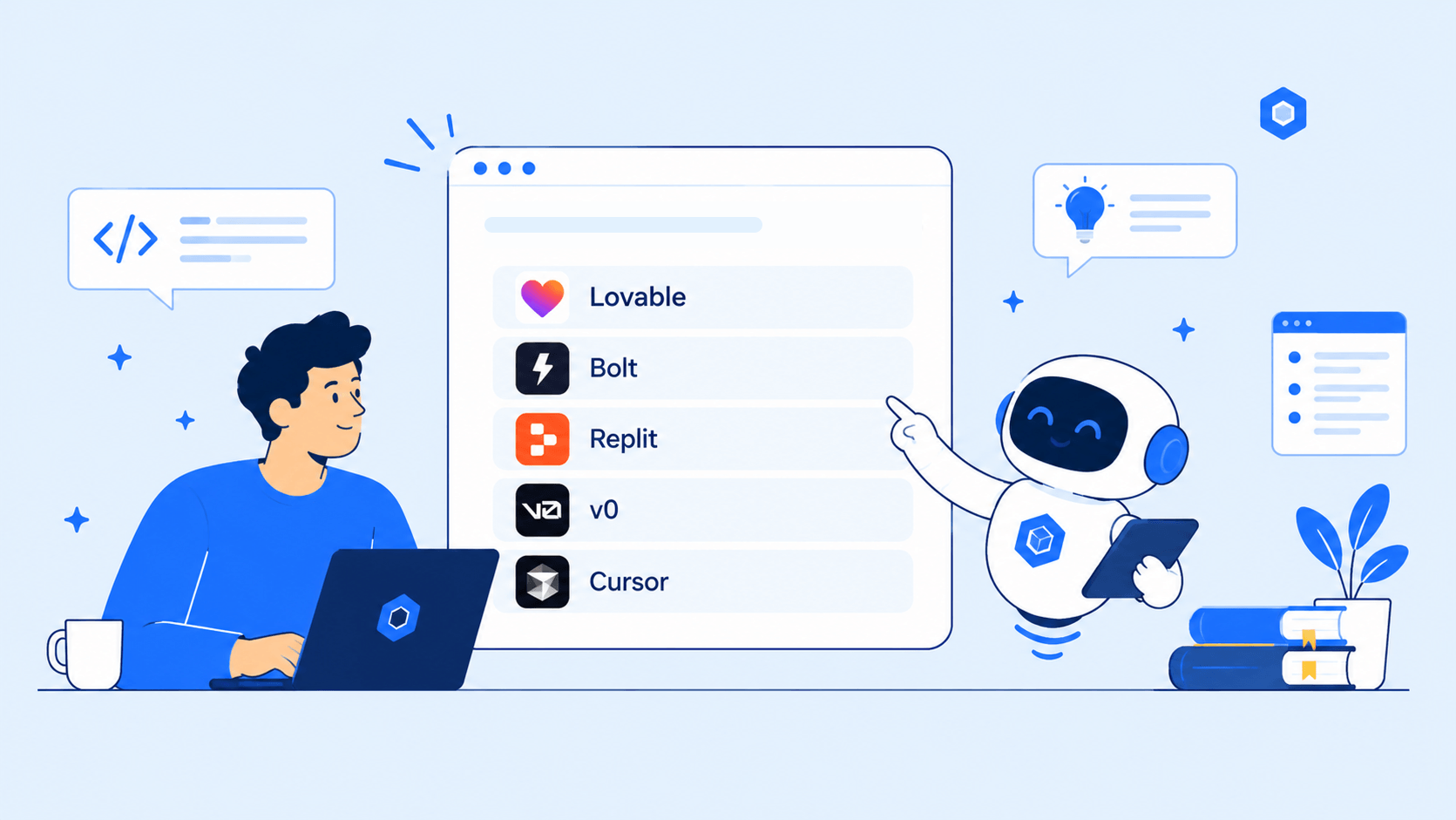
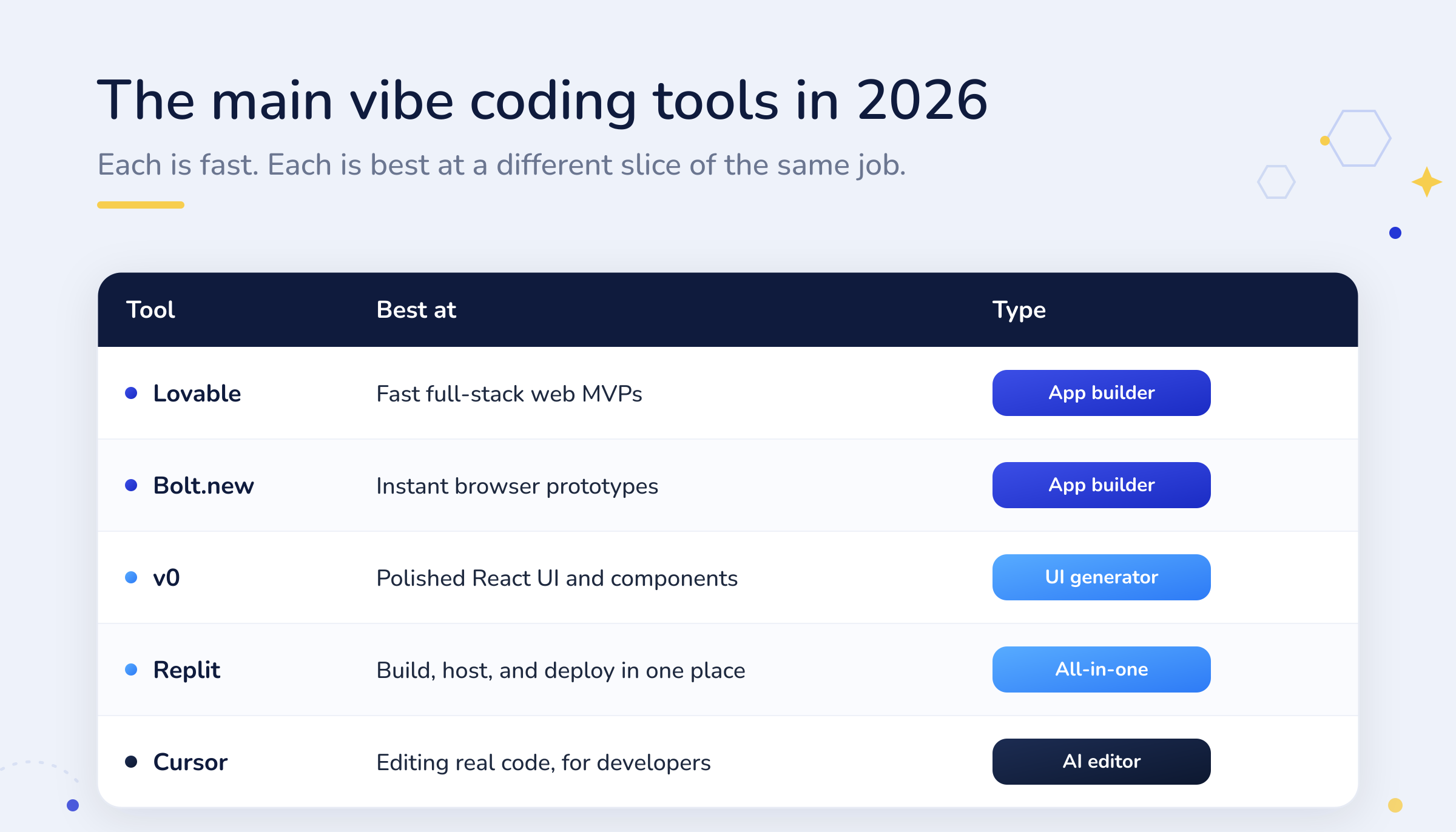
The best vibe coding tools in 2026 are Lovable, Bolt.new, v0, Replit, and Cursor, and each is best at a different slice of turning a prompt into a working app. Lovable and Bolt build full apps fast, v0 makes polished interfaces, Replit does everything in one workspace, and Cursor puts AI inside a real editor. All of them are genuinely good. All of them stop at the same line.
This guide is an honest look at what each tool is actually good at, so you can pick the right one for what you are building. Then it covers the part the marketing skips: every one of these tools takes you to a working prototype and hands you the rest. Knowing where that line falls is the difference between a demo and a product.
What is vibe coding, and what do these tools do?
Vibe coding is building software by describing what you want in plain language and letting AI write the code, judging the result by how it looks and behaves rather than by reading every line. The term went mainstream in 2025, and the tools matured quickly. Today the vibe coding market splits into three groups: browser app builders for non-developers, all-in-one platforms that also run the code, and AI editors for people comfortable seeing the code.
The promise is real. Someone with an idea and no engineering team can now describe an app and watch a working version appear. For exploring an idea, building a demo, or pitching a concept, that is a genuine leap. The five tools below are the ones worth knowing, and each earns its place.
One thing to keep straight as you read: these tools are not interchangeable. App builders and code editors solve different problems for different people, and picking the wrong category is a common, expensive mistake. A non-technical founder who reaches for a developer’s editor will hit a wall on day one, and a developer who only needs a clean component does not need a whole app builder. The comparison below sorts them by what they are actually for.
Lovable
Lovable is a browser app builder aimed squarely at non-technical founders. From a plain description it generates a full-stack web app, and it leans on established services for the hard parts, with two-way GitHub sync, Supabase for data, and Stripe for payments built in. It is often the fastest path from concept to something that could take a payment, sometimes inside a day. That GitHub sync also means you can hand the code to developers later. If you want a working full-stack web MVP with the least friction, Lovable is the strongest starting point, and its reliance on proven services for auth and billing quietly removes a lot of the risk that comes with generated code.
Bolt.new
Bolt.new, from StackBlitz, generates full-stack apps that run entirely in the browser, which makes it superb for instant prototypes and quick iteration. It reads Figma designs directly, so it can reproduce a layout with real fidelity. Its integration ecosystem is thinner than Lovable’s, and its token-based pricing means a long debugging session can burn credits fast. Reviewers are blunt about the trade-off: it is unbeatable for a quick demo, and its output should be treated as a starting point rather than something to ship as-is.
v0
v0, from Vercel, is not really an app builder; it is a component and interface generator, and a very good one. It produces clean React using shadcn/ui and Tailwind, and it shines on individual pages and components rather than whole applications. For a developer or a React and Next.js team who want polished front-end code to drop into an existing project, v0 is the sharpest tool of the group. Ask it to be a full backend and you are using it against its grain.
Replit
Replit is the all-in-one option. Its Agent takes a single prompt and builds, tests, and publishes an app, with the code, the runtime, the database, and the hosting all living in one workspace. That makes it the closest thing to conversational app development, and a great fit for solo projects, learning, and internal tools that never need to leave. The trade-off is that the convenience comes with platform dependency, and the generated code is idiosyncratic enough that a senior engineer will usually want to restructure it before a real team adopts it. It is a superb place to build and learn, and a harder place to grow a serious engineering team’s product out of.
Cursor
Cursor sits at the developer end of the spectrum. It is an AI-native code editor, a fork of VS Code, where you still see the code and the AI does much of the typing. It is the pick for people who can read code and want to move faster on a real codebase, with strong whole-project understanding and an agent for multi-file changes. It is less a way to skip coding and more a way to do it well, quickly, which is exactly why professional developers rate it. For a fuller view of the developer tools, see our guide to the best AI coding tools.
So which vibe coding tool should you use?
Match the tool to who you are and what you are building.
- Non-technical founder building a web MVP? Lovable, for the fastest full-stack path with payments and data handled.
- Want an instant prototype to react to? Bolt.new, for browser-based speed and Figma fidelity.
- Need polished UI for an existing project? v0, for clean React components.
- Want to build, run, and host in one place? Replit, if you are happy inside its platform.
- Comfortable with code and want speed? Cursor, for AI inside a real editor.
Notice that speed is not the deciding factor, because all of them are fast. The real differences are control, security, and what happens to the code afterwards. Which brings us to the line they share.
What none of them do
Here is the pattern under every vibe coding tool: it gets you to a working prototype, and then it hands you the rest. In an April 2026 experiment across five of these tools, EPAM found that all of them produced the first 80 percent of a design with ease, while the final 20 percent, the error handling and the specific behaviour that make software actually work, needed repeated hands-on fixing. That last stretch is not a rounding error. It is where a demo becomes a product.
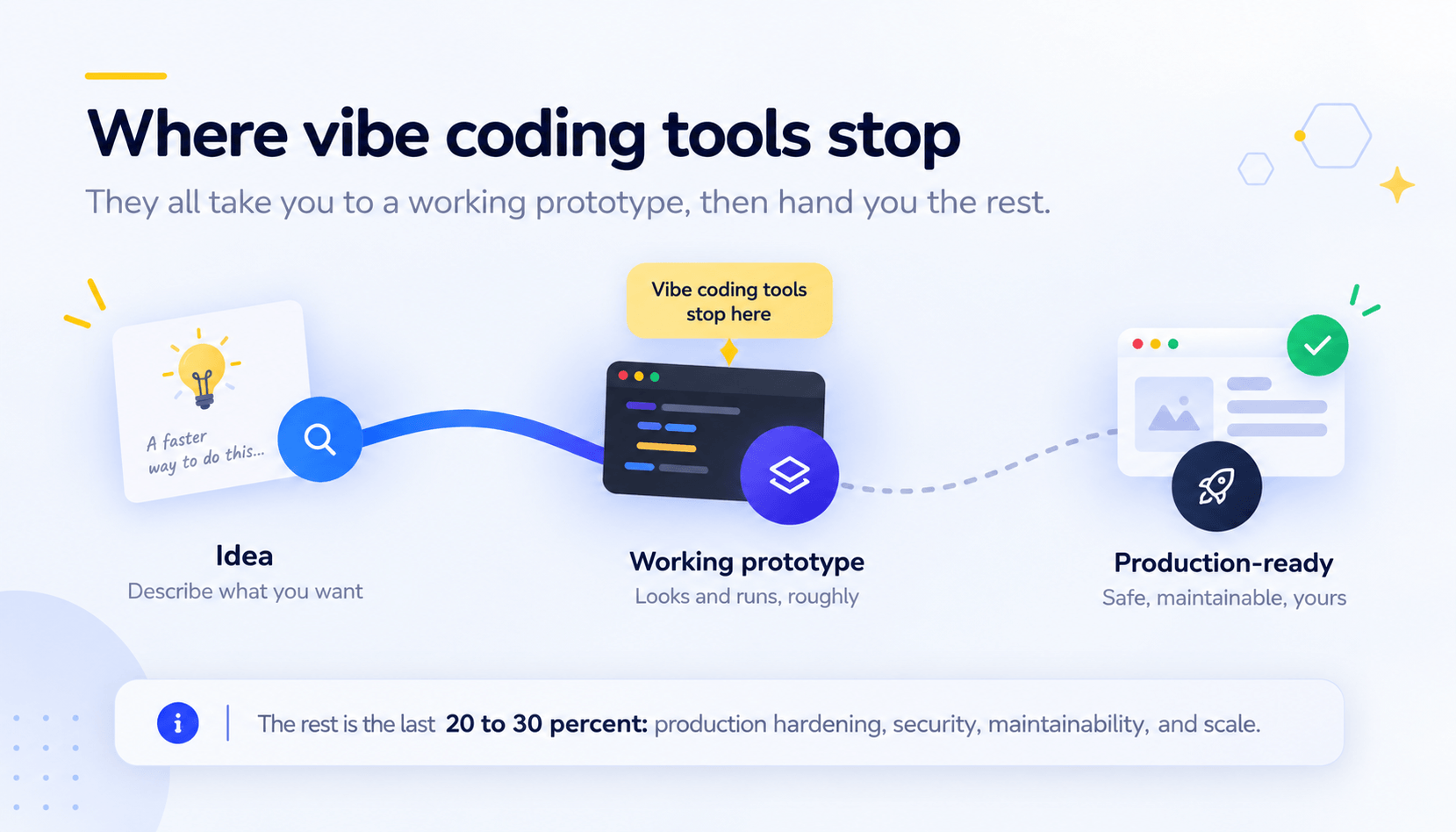
This is not a knock on the tools. Getting anyone to a working prototype from a sentence is remarkable, and for validating an idea it is often all you need. The problem starts when the prototype is mistaken for the product, because the two are separated by the hardest, least glamorous part of building software.
It is worth being precise about why that last stretch is hard. The first 80 percent is pattern-matching: assembling familiar components into something that looks right. The final stretch is judgement, the unglamorous decisions about what happens when a payment fails, when two users act at once, when the data is malformed, when someone tries to break in. Those are the parts a demo never exercises and a real product cannot avoid, and they are exactly the parts a tool optimised for shipping a prototype was never built to finish.
The rest they hand you
“The rest” is not vague. It is a specific, well-known list of work that these tools leave at your door.
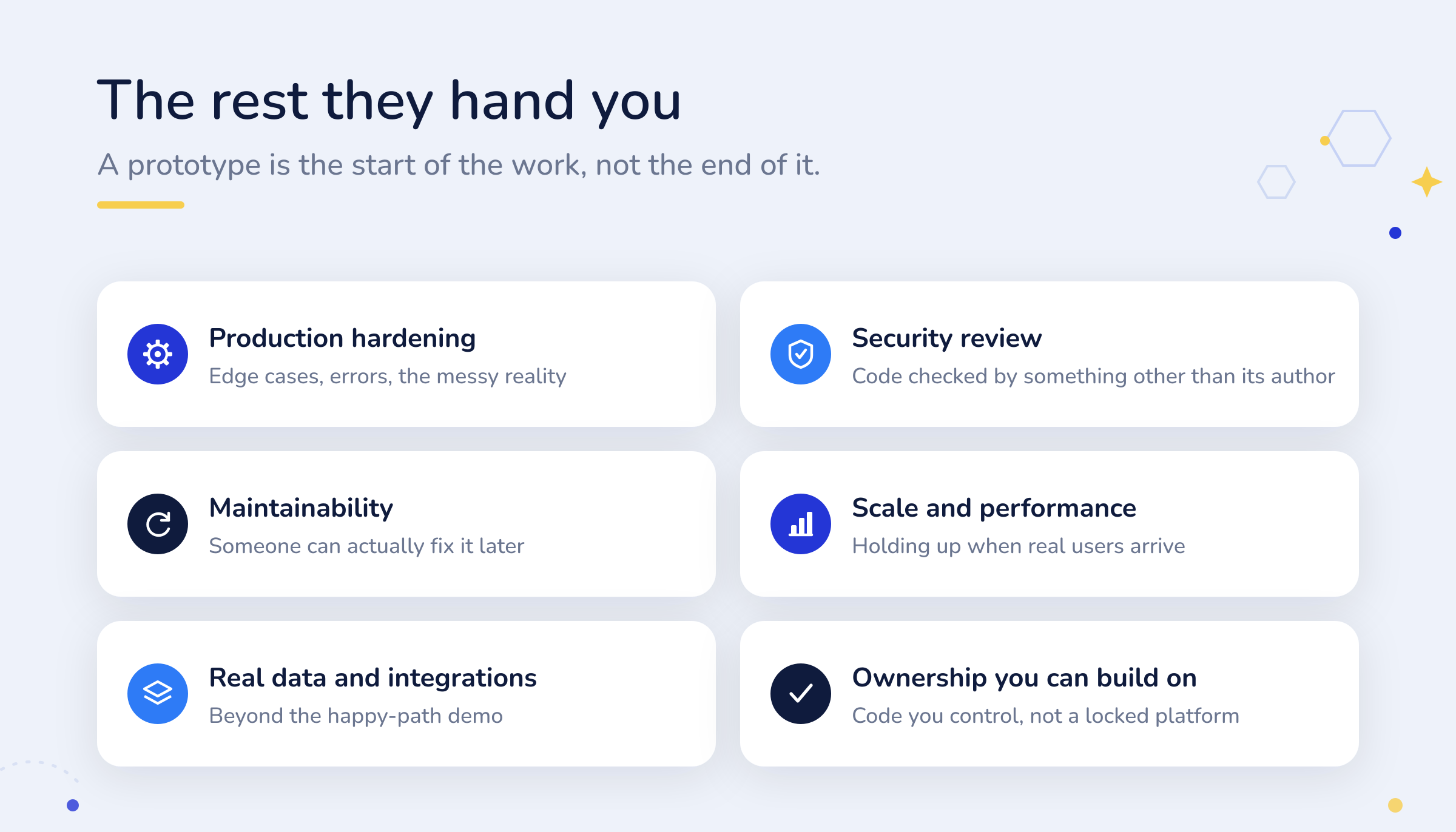
- Production hardening. A prototype handles the happy path. Real software handles the edge cases, the errors, and the messy reality of actual use.
- Security. Generated code needs to be checked by something other than the tool that wrote it. Left unreviewed, it is a liability, which is why some builders now bolt on paid security scans after the fact.
- Maintainability. Someone has to be able to fix and extend the code later. Output that a senior engineer would want to rewrite before adopting is technical debt on day one.
- Scale, real data, and ownership. Holding up under real users, handling real data rather than a demo, and leaving you with code you control rather than a locked platform.
None of this is a reason to avoid these tools. It is a reason to be clear-eyed about where their job ends and yours begins.
How to get from prototype to product
A prototype from any of these tools is genuinely useful. The mistake is treating it as the finish line. Here is the sensible way to use one.
- Use it to validate, not to launch. A prototype is the cheapest way to put an idea in front of real people and see if they want it. Let it do that job first.
- Decide the build path once the idea holds. If people respond, you now have a validated concept and a reference for what to build. That is the moment to choose how the real version gets made.
- Budget for the real work. The last 20 to 30 percent is where the cost lives. Knowing what it costs to build an app up front keeps the surprise out of the invoice.
- Insist on a real review. Whatever builds the production version, the code needs checking by something other than the tool that wrote it, and it needs to be maintainable by a real team.
Done this way, a prototype is a fast, low-cost first step in a longer process, not a half-built product you are quietly stuck with.
Where NeoCrew fits
NeoCrew was built by a team who spent fifteen years shipping software the hard way, then built the thing they wished existed. It is not a vibe coding tool, and it is not trying to be one. It is a platform for the part the prototype leaves unfinished: taking an idea and delivering a production-ready product you actually own.
The difference is structure. Where a vibe coding tool generates code and moves on, NeoCrew’s AI agents take an idea through defined stages, Discover, Design, Blueprint, and Build, with a human approving every gate. The code is reviewed, the scope is decided up front, and the output is meant to survive contact with real users, not just a screenshot. If a prototype has shown you an idea has legs, NeoCrew is built to turn it into the finished thing, and it is made for founders who have the idea but not the team. You bring the idea. The crew ships the product.
Frequently asked questions
What are the best vibe coding tools in 2026?
Lovable, Bolt.new, v0, Replit, and Cursor are the main ones. Lovable and Bolt build full apps from a prompt, v0 generates polished React interfaces, Replit builds and hosts in one workspace, and Cursor puts AI inside a real code editor. The best pick depends on what you are building and whether you can read code.
What is the best vibe coding tool for non-technical founders?
Lovable is the most approachable for a full-stack web app, with data and payments handled through built-in services and two-way GitHub sync so developers can extend it later. Bolt.new and Replit are also strong starting points for people with no coding experience.
Can you ship a vibe-coded app straight to production?
Usually not without work. These tools reliably produce the first 80 percent, but the final stretch, error handling, security, and maintainability, needs review and hardening. Treat the output as a validated starting point, not a finished product, especially for anything handling sensitive data.
What is the difference between an app builder and an AI code editor?
App builders like Lovable, Bolt, and v0 generate a working app or interface from a prompt, for people who may not code. AI code editors like Cursor assist you inside a real codebase and assume you can read the code. Choosing the wrong category wastes time and money.
Do vibe coding tools produce secure code?
Not by default. Generated code needs to be reviewed by something other than the tool that wrote it, and several builders now offer paid security scans precisely because unreviewed output is a risk. For anything real, plan for a proper security review as part of the work.
What do vibe coding tools not do?
They take you to a working prototype and hand you the rest: production hardening, security review, maintainability, scaling, real data handling, and code ownership. That last 20 to 30 percent is the difference between a demo and a product, and no vibe coding tool finishes it for you.
Got a prototype? Get the finished product
Vibe coding tools are a great way to see an idea working. When you are ready to turn that idea into a production-ready product you own, NeoCrew’s AI agents build it stage by stage, with your approval at every gate. See how NeoCrew works.