AI School App Builder
Every parent in the loop, zero circulars.
Attendance, homework, fees, events and announcements in one app parents actually check. Built around how your school runs, with the first look free.
You approve the screens. Your customers get the app.
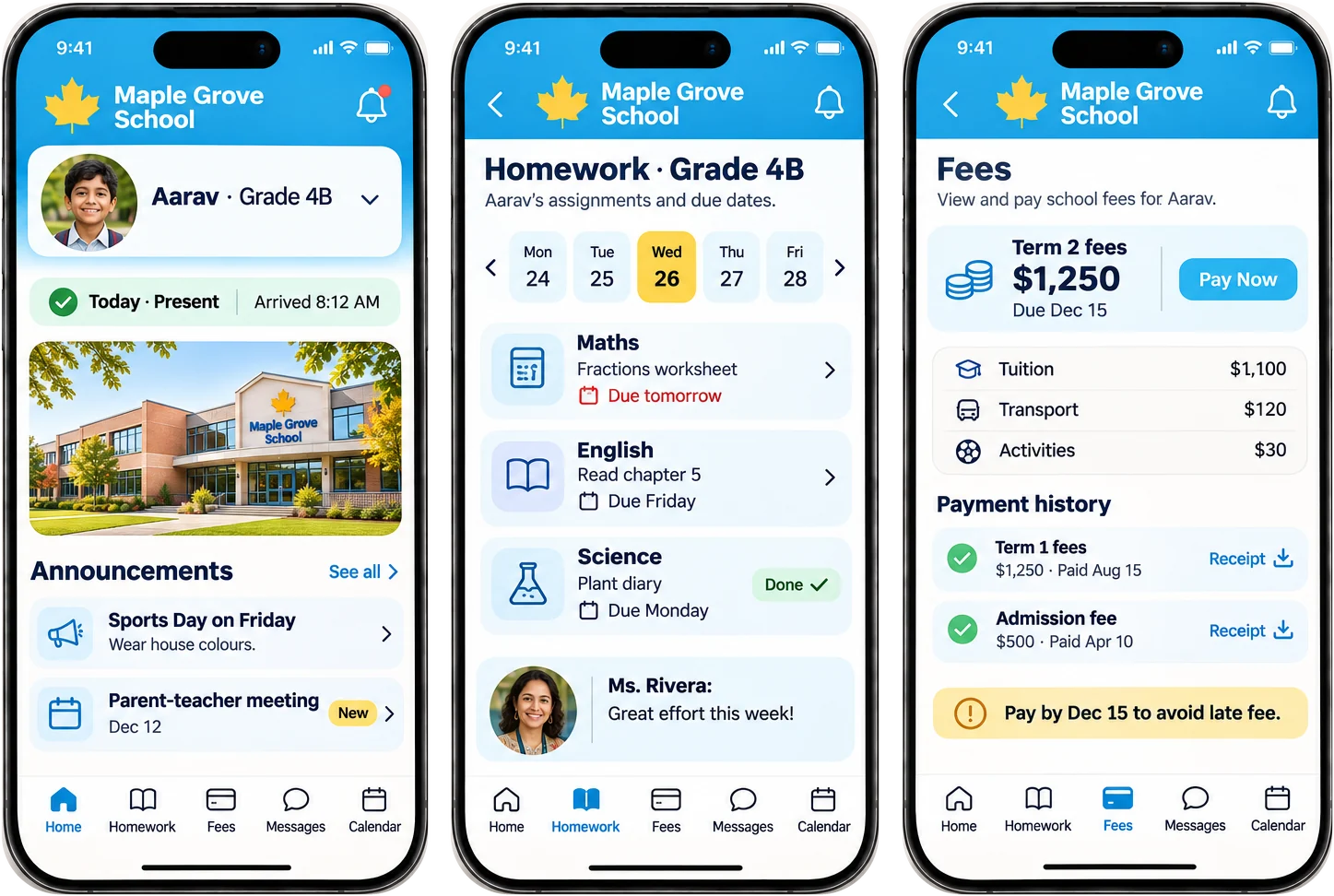
On the left, the NeoCrew workspace at the Design stage: every screen your plan needs, listed for your OK. On the right, what those screens become. Custom to your brand, never a template.
DESIGN · SCREENS
The screens
Attendance, announcements and child switcher.
Assignments by class and due dates.
Term fees, payment and receipts.
Teacher messages and school events.
Then NEO draws every screen · custom, never a template
In NeoCrew · the Design stage
What parents see
Everything your customers expect. Nothing off the shelf.
Announcements & circulars
School-wide, per-class or per-student messages with read receipts. No more lost paper circulars.
Homework & diary
Assignments posted per class with due dates and attachments. The diary that cannot be left at school.
Attendance & timetable
Daily attendance visible to parents, plus timetables and exam schedules that update themselves.
Fee payments
Term fees, transport and activity charges paid in-app with receipts and automated reminders.
Parent-teacher messaging
Structured messaging windows that respect teachers' evenings while keeping parents heard.
Admin dashboard
Attendance patterns, fee collection and engagement in one view for the office.
Why not WhatsApp groups and paper?
WhatsApp groups leak, bury notices and have no record of who saw what. A school runs on reliable communication, and that needs structure:
| WhatsApp groups & paper circulars | NeoCrew | |
|---|---|---|
| Announcements | Lost in busy group chats | Targeted notices with read receipts |
| Homework | Paper diaries left at school | Assignments posted per class, always on hand |
| Fees | Phone calls to chase payments | In-app payment with automatic reminders |
| Privacy | Parents' numbers shared in groups | Role-based access, parents see their own child |
| Records | Nothing to look back on | Attendance, fees and messages on record |
| Testing | Issues found by your parents | Independent tests and a clean-room run before launch |
| Changes later | Wait for the vendor's roadmap | Describe the change; it ships after every check passes |
| When it breaks | A support ticket queue | A repair loop that fixes and re-verifies automatically |
Comparison reflects common limitations of these tools; specifics vary by vendor. Checked November 2026.
Four stages. You approve every handoff.
The same process behind every NeoCrew build: Discover, Design, Blueprint and Build, run by AI agents, verified independently, approved by you.
Describe it in plain words
Tell us about your school: classes, fees, how communication works today. You approve a readable plan.
See every screen first
The parent home, teacher posting flow and office dashboard as real screens first.
Engineered before built
Data privacy, fee flows and messaging rules engineered and documented before code.
Built, tested, live
Built, independently tested, live on its own cloud, and kept repaired through the term.
Built by a team that has shipped before.
Frequently asked questions
The scoping document and first designs are free, so management sees the app before any budget is spent. The staged build is a fraction of enterprise school-software licensing, with no per-student fees afterwards.
Yes. Term fees, transport and activities are paid through your school's own payment account with instant receipts, and automated reminders do the chasing the office used to do by phone.
Yes. Role-based access, encrypted storage and audit trails are designed in the Blueprint stage and verified before launch. Parents see their own children only, teachers see their classes, and the school controls everything.
Minutes, not days. Posting homework or an announcement works like sending a message, and the design is approved by your staff before anything is built, so it fits how they already work.
Yes. Batches, test scores, fee plans and parent updates follow the same patterns. Describe how your institute runs during Discover and the plan is written around it.
Most schools need six: announcements, homework and a digital diary, attendance, fee payments, parent-teacher messaging, and a school calendar. NeoCrew plans yours around your classes, fees and how you talk to parents today.
Yes. Parents only see their own children, teachers see their classes, and every action is recorded. Your app runs on its own isolated cloud and is security-reviewed before launch.
Building something adjacent? NeoCrew also builds course apps or sports club apps, or see every kind of app on the AI app builder page.
Run the school, not the group chats.
Tell us about your school. The plan and first designs are free.
Prefer a human first? Talk to us.