---
title: "AI Internal Tool App Builder"
url: "https://neocrew.ai/ai-app-builder/internal-tool-builder/"
date: "2026-11-26T14:05:21+00:00"
modified: "2026-11-26T14:05:21+00:00"
author:
name: "Jhilik"
word_count: 895
reading_time: "5 min read"
summary: "Home/AI App Builder/Internal Tool
Internal tool app builder
AI Internal Tool App Builder
The tool your spreadsheet wants to be.
Approval flows, trackers, dashboards and ops consoles built around yo..."
description: "Home/AI App Builder/Internal Tool Internal tool app builder AI Internal Tool App Builder The tool your spreadsheet wants to be. Approval flows, trackers, das..."
language: "en"
schema_type: "WebPage"
---
# AI Internal Tool App Builder
_Published: November 26, 2026_
_Author: Jhilik_
Inside the build
## You approve the screens. Your customers get the app.
On the left, the NeoCrew workspace at the Design stage: every screen your plan needs, listed for your OK. On the right, what those screens become. Custom to your brand, never a template.
*●* NeoCrewstackline-ops ▾6,182 creditsDESIGN · SCREENS
#### The screens
NEO I checked 30 things your PRD asks for: every one has a screen.**Approvals**3 screensRequests, approve and reject, with context.
**Dashboard**2 screensKPIs, charts and alerts.
**Tasks**3 screensAssignments, handoffs and escalations.
**Audit log**2 screensEvery change, recorded automatically.
BackApprove the screensThen NEO draws every screen · custom, never a template
In NeoCrew · the Design stage
*→*You approve.
NEO builds.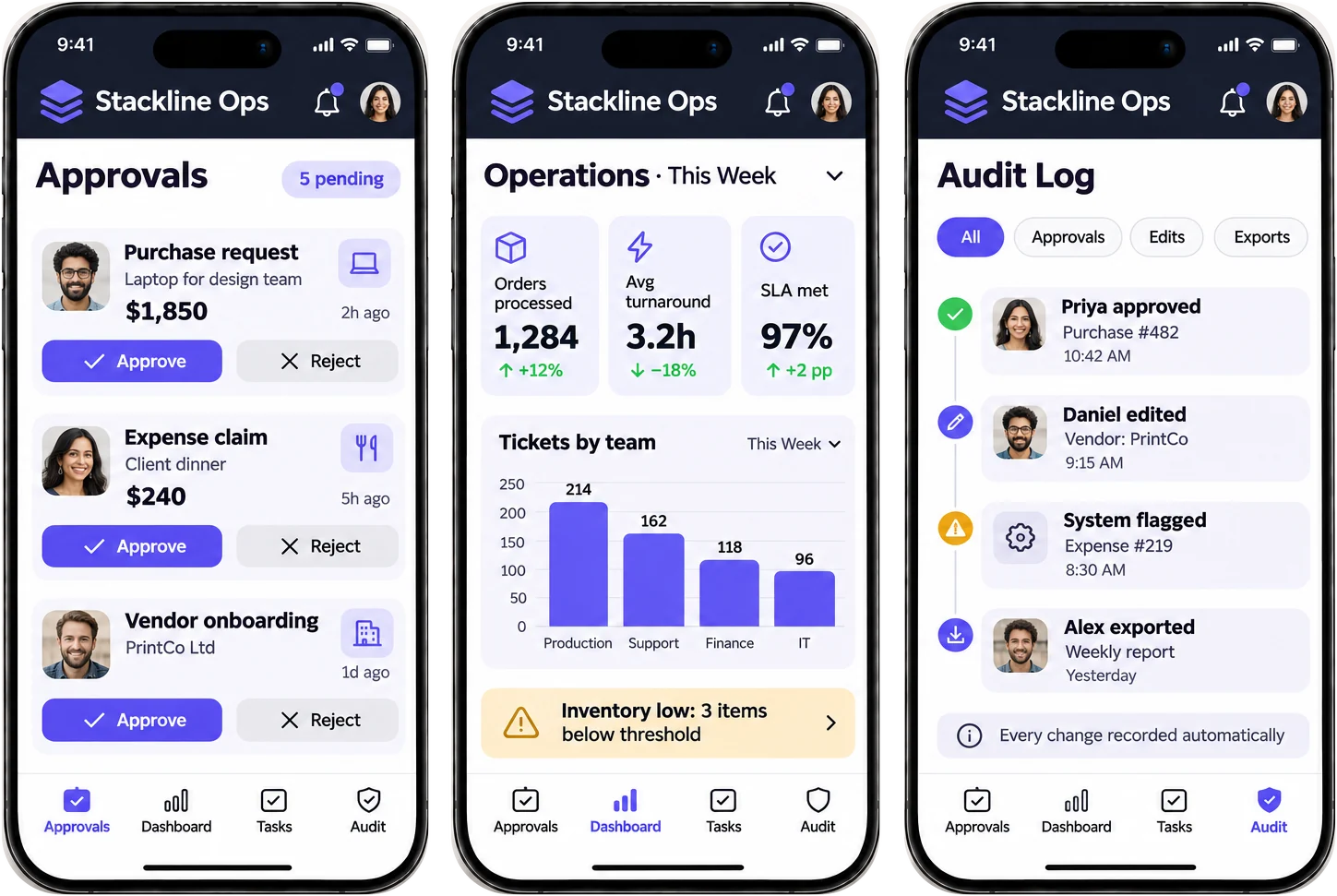What your team sees
What your app can do
## Everything your customers expect. Nothing off the shelf.
### Workflow automation
Approvals, handoffs and escalations encoded exactly as your operation runs them.
### Live dashboards
The numbers your team re-builds in spreadsheets weekly, live and permissioned instead.
### Roles & permissions
Who can see, edit and approve what, enforced in the architecture rather than by trust.
### Data entry that validates
Forms that reject bad data at the door, so reports stop lying by accident.
### Alerts & escalations
Thresholds and overdue items that raise their own hand before they become incidents.
### Audit trails
Who changed what and when, recorded automatically for the day someone asks.
The honest comparison
## Why not a no-code tool builder?
No-code builders are fast until the logic gets real, then you maintain a fragile board of blocks nobody dares touch. Internal tools deserve engineering:
No-code tool builders vs NeoCrew
| | No-code tool builders & spreadsheets | NeoCrew |
|---|---|---|
| Logic | Fragile blocks nobody dares touch | Real software built from an approved plan |
| Permissions | Shared links and trust | Roles enforced in the architecture |
| Audit trail | Version history, if any | Every change recorded automatically |
| Pricing | Per-seat fees as the team grows | No per-seat licence |
| Data | On a vendor’s shared platform | On your own isolated infrastructure |
| Testing | Issues found by your team | Independent tests and a clean-room run before launch |
| Changes later | Wait for the vendor’s roadmap | Describe the change; it ships after every check passes |
| When it breaks | A support ticket queue | A repair loop that fixes and re-verifies automatically |
Comparison reflects common limitations of these tools; specifics vary by vendor. Checked November 2026.
How it gets built
## Four stages. You approve every handoff.
The same process behind every NeoCrew build: [Discover](https://neocrew.ai/discover/), [Design](https://neocrew.ai/design/), [Blueprint](https://neocrew.ai/blueprint/) and [Build](https://neocrew.ai/build/), run by AI agents, verified independently, approved by you.
01
### Describe it in plain words
Describe the process and the spreadsheet it lives in today. The plan arrives readable.
You approve the plan02
### See every screen first
Screens for every role in the workflow, real and clickable, before any code.
You approve the designs03
### Engineered before built
Data model, permissions and integrations engineered and documented first.
You sign off the foundation04
### Built, tested, live
Built, independently tested, deployed on isolated infrastructure, and kept repaired.
You press launchWhy trust it
## Built by a team that has shipped before.
**400+**products shipped by this team**100M+**end users served**15+**years building software**5.0**client rating on Clutch*✓*Tests the coding AI never sees*✓*A clean-room run before launch*✓*Nothing deploys without youFAQ
## Frequently asked questions
Scope decides it, and scope is free to find out: the scoping document and first designs cost nothing. Staged construction by AI agents keeps builds to a fraction of internal engineering time or agency quotes.
You get real, tested software instead of a canvas of blocks. Logic is verified by independent tests the building AI cannot see, permissions live in the architecture, and nothing depends on a subscription platform’s roadmap.
Yes. APIs, databases and spreadsheets you already use are mapped during Blueprint, and integrations are specified and tested like everything else. Your tool joins the stack rather than fighting it.
Describe the change in plain words and it is built the same verified way, shipped only after every existing check still passes. No archaeology through a no-code canvas.
Yes. Each tool runs on its own isolated cloud with role-based access and audit trails designed in Blueprint, and security is reviewed independently before launch.
An internal tool is software your team uses to run the business: approval flows, ops dashboards, trackers and admin panels. They usually start life as spreadsheets. NeoCrew builds them as real, tested software shaped around your exact process.
No-code builders are fast to start but hard to maintain once the logic gets real. NeoCrew builds proper software from an approved plan, enforces permissions in the architecture, and verifies everything with independent tests, with no per-seat licence.
Building something adjacent? NeoCrew also builds [CRM apps](https://neocrew.ai/ai-app-builder/crm-app-builder/) or [inventory apps](https://neocrew.ai/ai-app-builder/inventory-management-app-builder/), or see every kind of app on the [AI app builder](https://neocrew.ai/ai-app-builder/) page.
## Retire the spreadsheet. Keep the process.
Describe the workflow. The plan and first designs are free.
Prefer a human first? [Talk to us](https://neocrew.ai/#contact).
Related builders[CRM App Builder](https://neocrew.ai/ai-app-builder/crm-app-builder/)[Inventory App Builder](https://neocrew.ai/ai-app-builder/inventory-management-app-builder/)[SaaS App Builder](https://neocrew.ai/ai-app-builder/saas-app-builder/)[White Label App Builder](https://neocrew.ai/ai-app-builder/white-label-app-builder/)[All builders →](https://neocrew.ai/ai-app-builder/)
---
_View the original post at: [https://neocrew.ai/ai-app-builder/internal-tool-builder/](https://neocrew.ai/ai-app-builder/internal-tool-builder/)_
_Served as markdown by [Third Audience](https://github.com/third-audience) v3.5.3_
_Generated: 2026-11-26 14:05:21 UTC_